Free online tool, read in your browser
EDI viewer online
Drop or paste an EDIFACT or X12 file: every segment and element is named, known codes are explained and the envelope is checked, by the engine of EDI Reader for VS Code. ORDERS, INVOIC, DESADV, 850, 810, 856 or any other message. The file is read 100% in your browser: nothing is uploaded.
- Nothing uploaded: the page cannot send your file
- EDIFACT and X12, detected automatically
- Free, no sign-up
Drop an EDI file here
or choose a file, up to 8 MB. It is read on this page, nothing is uploaded.
No file at hand? Try a sample (fictional data):
Up to 8 MB per file. The viewer names the segments, elements and codes of its built-in dictionary; a segment it does not know is shown as is, never hidden.
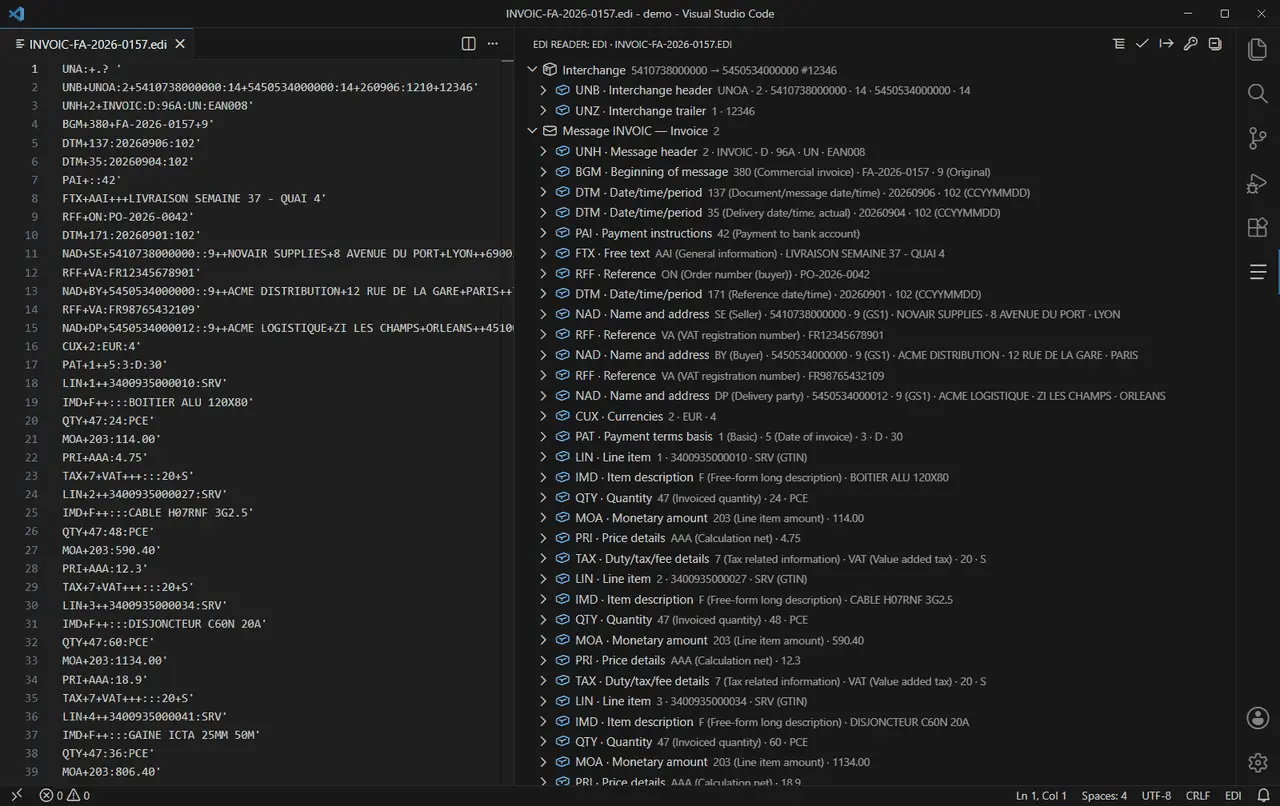
An EDIFACT viewer online
ORDERS, INVOIC, DESADV and any other UN/EDIFACT message. Segments are named (NAD = Name and address), codes are explained, one segment per line.
An X12 viewer for 850, 810, 856 and any other transaction set
BEG = Beginning Segment for Purchase Order, PO1 = Baseline Item Data: every segment and element is named, every known code explained.
What the viewer shows
57 EDIFACT and 44 X12 segments named, 278 code labels built in; a segment the dictionary does not know is shown raw, never hidden.
How to read an EDI file in three steps
Find the envelope first: UNB to UNZ in EDIFACT, ISA to IEA in X12. Then each message: UNH to UNT, or ST to SE, with its type (ORDERS, 850…) in the header. Then the lines: LIN, QTY and PRI in EDIFACT, PO1 or IT1 in X12. Select a row to see each element named and the meaning of its code.
What the check looks at
The segment counts announced by UNT and SE, the control references repeated by UNZ, IEA, GE and SE, the message and group counts, the CTT line count of an 850, 810 or 856, and the mandatory segments of ORDERS, DESADV, INVOIC, 850, 810 and 856. The viewer tells you how many problems it found; EDI Reader Pro in VS Code shows each one on its segment.
Samples you can load
Six fictional interchanges: EDIFACT ORDERS and INVOIC (D96A), X12 850 purchase order and 856 ship notice (004010), and two files with two mistakes each, one EDIFACT and one X12, to see what a rejected file looks like.
Questions
Is my file uploaded?
No. The viewer reads the file with your browser's own JavaScript, and the page's security policy forbids it any network connection. Once the page has loaded, it works even offline.
Which files can it open?
UN/EDIFACT interchanges, with or without UNA, and ANSI X12 interchanges, whatever the file extension, up to 8 MB. 57 EDIFACT and 44 X12 segments named, 278 code labels built in; a segment the dictionary does not know is shown raw, never hidden.
How do I read an EDIFACT or X12 file?
Drop it on this page, choose it or paste its text. Each line is a segment: its tag, its name and its content. Select a segment to see each element named and the meaning of known codes.
What does EDI Reader for VS Code add?
The same engine in your editor, for the files you open every day: hover explanations, the Inspector, the Outline, one segment per line and back. EDI Reader Pro adds:
- Check a message against its type (mandatory segments, counts, references)
- Automatic check on open and save
- Export to CSV and JSON
- Check a whole folder
- HTML check report
- Compare two interchanges segment by segment
- Create an anonymised copy to send to support
Is it free?
Yes: no sign-up and no limit on the number of files.
Which EDIFACT directories and X12 versions can it read?
Any of them: the viewer reads the version from UNH (for example D:96A) or GS08 (for example 004010) and splits the file the same way. Names come from one built-in dictionary of the segments used most, not from one directory per release.
Why does my X12 file show only a few unknown segments?
Most often the ISA segment is not exactly 106 characters. X12 separators are read from fixed positions of ISA (characters 4, 105 and 106); one missing space in a padded ID moves them, and the file falls apart. Count the ISA first.
Does it check my file?
Yes, on the envelope and on the main message types: segment counts, control references, CTT line counts and mandatory segments. It tells you how many problems it found. It does not know your partner's implementation guide, which can add its own rules.
Can it open 997 and CONTRL acknowledgments?
Yes. The message type is named; the acknowledgment segments (AK1 to AK9, UCI, UCM) are not in the built-in dictionary yet and are shown as is, with their element positions, never hidden.
Can I edit or convert the file here?
No. The viewer reads and checks; it never changes your file. You can copy it with one segment per line. EDI Reader Pro for VS Code exports the decoded message to CSV or JSON.