Your partner rejected the file. Find out why, before the cut-off.
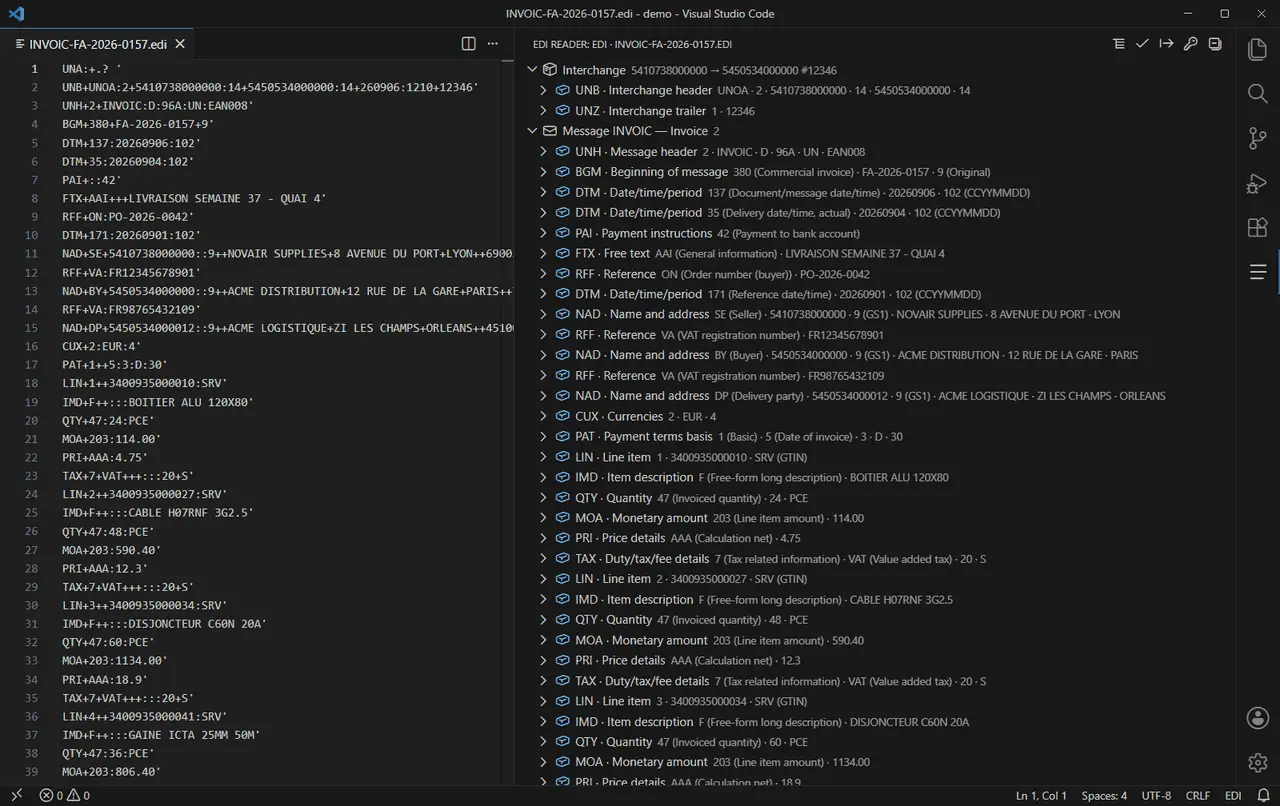
EDI Reader turns a wall of UNB+UNOA:2+… into a readable tree inside VS Code: every segment named, every code translated. No 300-page implementation guide open on the second screen, no upload — your trading data never leaves your machine.
- Nothing uploaded
- No account
- 180+ segments named
How it works
Three steps, no account, no file leaves your machine.
- Open the fileOpen any .edi, .edifact or .x12 file in VS Code and run “EDI: Decode”. UNA, UNB and ISA envelopes are detected on their own — no configuration, no project setup.
- Read it in plain wordsEach segment gets its real name and each qualifier its label: NAD+BY becomes Buyer, QTY+12 becomes despatch quantity. The tree stays selectable text, so you can copy any value straight into a ticket.
- Check it, then hand it overPro checks the message against its type, flags the missing mandatory segments and cardinality errors, and exports the whole thing to CSV or JSON for the analyst, the ticket or a test fixture.
What the extension does
A reader and a checker, not an EDI platform. It does not replace your translator or your VAN: it saves you the segment counting and the round trips with your trading partner.
Named decoding, EDIFACT and X12
UN/EDIFACT and ANSI X12 in the same view: 180+ segments named, every code label resolved from dictionaries built into the extension.
Validation by message type
ORDERS, DESADV, INVOIC, 850, 810, 856: missing mandatory segments, cardinality and structure errors, unknown codes — each one with its line and position.
100 % local
Decoding, validation and export all run on your machine. The extension makes one network call in its life: checking your licence key when you activate Pro.
CSV and JSON export
Hand the decoded message to an analyst, diff two interchanges, feed a test fixture. Standard columns, one row per segment, no reformatting.
Folder batch check
Point it at the day's folder: every file is decoded and checked, with a verdict per file and a report you can attach to a ticket or send to the partner.
Fast and light
No language server, no daemon, no runtime dependency. A 400-segment interchange is decoded in well under a second.
Free, and Pro when you need it
The free version fully solves “I cannot read this file”, for good, with no expiry. Pro is for the day you have sixty of them and a partner waiting: half a day of checking them by hand costs more than the licence, and the licence is paid once.
Free
Published on the Marketplace and on Open VSX, with no time limit.
- Decode any EDIFACT or X12 file
- Every segment named, every code labelled
- Unlimited files, no sign-up
- Validation by message type
- CSV and JSON export
- Folder batch check
Pro
One licence key, no expiry, up to 5 machines.
- Everything in the free version
- Validation against the message type
- CSV and JSON export of the decoded message
- Folder batch check, one verdict per file
- Saveable check report for a ticket
- Works offline once activated
Refunded within 14 days, no conditions and no questions asked. Payment, invoice and VAT handled by Gumroad, merchant of record.
Frequently asked questions
Is my EDI data sent anywhere?
No. Files are decoded on your machine, inside the editor. The extension makes exactly one network call in its life: verifying your licence key with Gumroad when you activate Pro. Nothing else, ever.
Which formats and versions are supported?
UN/EDIFACT and ANSI X12. UNA, UNB and UNH envelopes as well as ISA, GS and ST are detected automatically; a segment the dictionary does not know is shown raw rather than hidden, so you never lose data.
Does it certify that my file is compliant?
No, and nobody can promise that in your place. Validation runs against the public message dictionaries. Your partner's implementation guide adds its own rules, which no generic tool can know.
What is the difference between free and Pro?
Free decodes any file into a named, readable tree, without limit. Pro adds validation by message type, CSV and JSON export, folder batch checks and the saveable check report.
How does the licence key work?
Gumroad sends you a key right after payment. In VS Code, run “EDI: Enter my Pro licence key” and paste it: it is checked once online, then stored locally. After that the extension works offline. Up to 5 machines, no expiry, no subscription.
Does it work in Cursor, VSCodium or Gitpod?
Yes. The extension is published on the VS Code Marketplace and on Open VSX, so any editor built on VS Code can install it, and the same licence key works everywhere.