Your partner rejected the file. Find out why, before the cut-off.
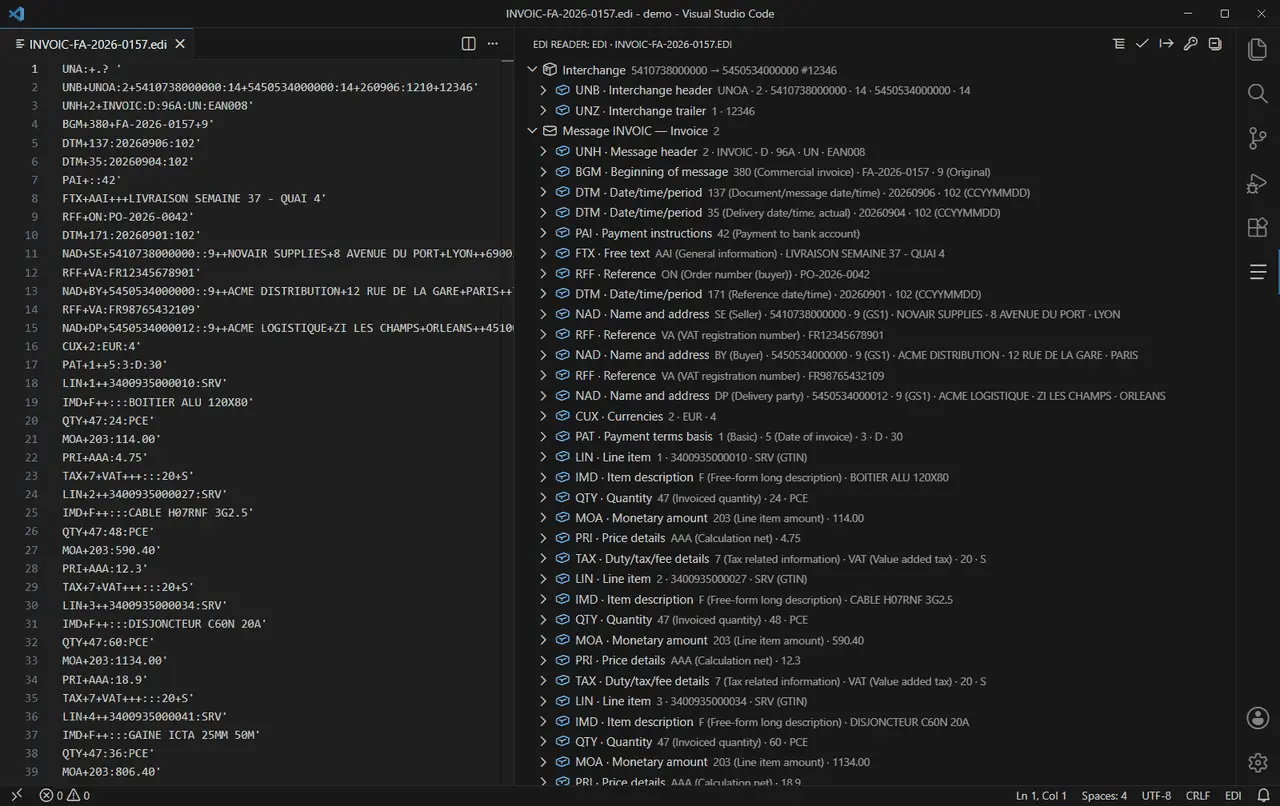
EDI Reader turns a wall of UNB+UNOA:2+… or ISA*00*… into a readable tree inside VS Code: every segment named, every code translated, and a check that says which count or reference your partner rejected. Nothing is uploaded.
Or try it in your browser: EDI viewer online, nothing uploaded
DESADV rejected by a retailer? Read the guide: SSCC, GLN and the errors that cause rejections
- Nothing uploaded
- No account
- 101 segments named, 278 code labels
How it works
Three steps, no account, no file leaves your machine.
- Open the fileOpen any .edi, .edifact or .x12 file in VS Code and run “EDI: Decode”. UNA, UNB and ISA envelopes are detected on their own — no configuration, no project setup.
- Read it in plain wordsEach segment gets its real name and each qualifier its label: NAD+BY becomes Buyer, QTY+12 becomes despatch quantity. The tree stays selectable text, so you can copy any value straight into a ticket.
- Check it, then hand it overPro checks the message against its type, flags the missing mandatory segments and cardinality errors, and exports the whole thing to CSV or JSON for the analyst, the ticket or a test fixture.
What the extension does
A reader and a checker, not an EDI platform. It does not replace your translator or your VAN: it saves you the segment counting and the round trips with your trading partner.
Named decoding, EDIFACT and X12
UN/EDIFACT and ANSI X12 in the same view, whatever the directory release: 57 EDIFACT and 44 X12 segments named, 278 code labels built into the extension; a segment the dictionary does not know is shown raw, never hidden.
Check by message type (Pro)
ORDERS, DESADV, INVOIC, 850, 810, 856: missing mandatory segments, UNT and SE segment counts, CTT line counts, control references, empty party qualifiers, lines without item or quantity, each one on its segment. Other message types get the envelope checks.
100 % local
Decoding, validation and export all run on your machine. The only network call is the licence check with Gumroad: at activation, then at most once a day while Pro is active. It carries the key only, never file content.
CSV and JSON export (Pro)
Hand the decoded message to an analyst, compare two exports in your usual diff tool, feed a test fixture. Standard columns, one row per segment, no reformatting.
Folder batch check (Pro)
Point it at the day's folder: every file is decoded and checked, with a verdict per file and a report you can attach to a ticket or send to the partner.
Compare two interchanges (Pro)
Every difference named segment by segment, side by side, with a jump to the segment and CSV export. Envelope references and dates can be ignored. The free version tells you how many differences there are.
Anonymised copy for support (Pro)
Names, addresses, contacts, identifiers, amounts, references and free texts are replaced with consistent aliases of the same length: same structure, same check result. Consistent aliases are pseudonyms: the same value always gives the same alias, so the copy may still be personal data. Check the copy before sending it.
Large files, no silent freeze
Files up to 8 MB are decoded as you open them. Above 8 MB, EDI Reader asks before decoding and says why a file was not decoded; Files larger than 8 MB: Decode without asking brings back the 1.1 behaviour.
Fast and light
No language server, no daemon, no runtime dependency. 190,000 segments (4 MB) decode in about a second; a typical 400-segment interchange in well under a second.
Free, and Pro when you need it
The free version fully solves “I cannot read this file”, for good, with no expiry. Pro is for the day you have sixty of them and a partner waiting: half a day of checking them by hand costs more than the licence, and the licence is paid once.
Free
Published on the Marketplace and on Open VSX, with no time limit.
- Decode EDIFACT and X12 into a named tree
- Hover explanations, Inspector, Outline, colours
- One segment per line and back
- Unlimited files, 100% local
- Classic mode: the 1.0 look back in one setting
- Count the differences between two files
- Count what an anonymised copy would mask
- Check a message against its type
- Export to CSV and JSON
- Check a whole folder
Pro
One licence key, no expiry, up to 5 machines.
- Everything in the free version
- Check a message against its type (mandatory segments, counts, references)
- Automatic check on open and save
- Export to CSV and JSON
- Check a whole folder
- HTML check report
- Compare two interchanges segment by segment
- Create an anonymised copy to send to support
- Works offline once activated
Team: 5 people, 25 machines — EUR 99.17 + VAT where applicable
Refunded within 14 days, no conditions and no questions asked. Payment, invoice and VAT handled by Gumroad, merchant of record.
Frequently asked questions
Is my EDI data sent anywhere?
No. Files are decoded on your machine, inside the editor. The only network call is the licence check with Gumroad: at activation, then at most once a day while Pro is active. It carries the key only, never file content.
How much does EDI Reader Pro cost, with VAT?
EUR 24.17 + VAT where applicable, paid once. Gumroad adds your country's VAT at checkout and shows the total before you confirm; in the United States, or for an EU business with a valid VAT number, no VAT is added. Gumroad, Inc. is the merchant of record and issues the invoice. There is no subscription and no later charge.
Can I get an invoice, with or without VAT?
Need an invoice? Use the “Generate” link at the bottom of your Gumroad receipt: enter your name and business address, add what your accounts need under “Additional notes”, and download the PDF. An EU business that paid VAT can enter its VAT number there: Gumroad refunds the VAT and the invoice shows no VAT. Gumroad cannot change an invoice afterwards.
On how many machines can I use one key?
Up to 5 machines with the same key: laptop, desktop, work VM. Sharing with colleagues? A Team key covers 5 people and 25 machines (EUR 99.17 + VAT where applicable): choose Team at checkout.
Does it work offline?
Yes. Decoding and checks never need the network. After activation, the key is rechecked at most once a day; between checks, and if Gumroad cannot be reached, Pro keeps working.
Which formats are supported?
UN/EDIFACT and ANSI X12, whatever the message type: 57 EDIFACT and 44 X12 segments are named and 278 code labels are built in. UNA, UNB and UNH envelopes as well as ISA, GS and ST are detected automatically; a segment the dictionary does not know is shown raw rather than hidden, so you never lose data.
Which EDIFACT directories and X12 versions does it read?
Decoding does not depend on a release: EDI Reader reads the version from UNH (for example D:96A) or from GS08 (for example 004010) and decodes the file the same way. Segment and code names come from one built-in dictionary of the segments used most, not from one directory per release, so we do not publish a list of supported releases. Our sample files are D96A and 004010.
What does the Pro check find?
For ORDERS, DESADV, INVOIC, 850, 810 and 856: missing mandatory segments, wrong segment counts in UNT and SE, CTT line counts that do not match, header and trailer references that differ, empty party qualifiers and lines without item or quantity. Every other message type gets the envelope checks: UNB/UNZ, UNH/UNT, ISA/IEA, GS/GE and ST/SE counts and references. The free version runs the same check and tells you how many problems a file has.
Does it certify that my file is compliant?
No, and nobody can promise that in your place. Validation runs against the public message dictionaries. Your partner's implementation guide adds its own rules, which no generic tool can know. If you need those rules checked, Novair builds the checker for your files as a fixed-price custom work package: sur-mesure.novair.app.
What is the difference between free and Pro?
Free decodes any file into a named, readable tree, without limit, with hover explanations, the Inspector, the Outline and colours; it also counts the differences between two files and what an anonymised copy would mask. Pro adds validation by message type, automatic checks on open and save, CSV and JSON export, folder batch checks, the HTML check report, the segment-by-segment comparison of two interchanges and the anonymised copy to send to support.
How is it different from EDI Support, the most installed EDI extension?
EDI Support (DericLee) is free and open source and covers more formats: X12, HIPAA, EDIFACT and VDA, with a preview panel, diagnostics and inlay hints. If you work with HIPAA or VDA files, it is the better choice. EDI Reader is built for EDIFACT and X12 supply-chain messages: the Inspector table and a check by message type, and in Pro the folder check, CSV and JSON export, the side-by-side comparison and the anonymised copy.
How does the licence key work?
Gumroad sends you a key right after payment. In VS Code, run “EDI: Enter my Pro licence key” and paste it: it is checked online, then stored locally; the extension rechecks it at most once a day and keeps working offline in between. Up to 5 machines (25 with a Team key), no expiry, no subscription.
Can I get a refund?
Yes, within 14 days of purchase, with no conditions and no questions asked: reply to the Gumroad receipt or write to support@novair.app.
Can I keep the 1.0 look?
Yes. Settings › EDI Reader › Experience: Classic brings back the 1.0 look (the tree and the commands only). You can also run “EDI: Switch between Enhanced and Classic look”, and each new behaviour has its own setting: hover, colours, Outline, status bar, automatic Pro checks, the one-time rating request, Compare and Anonymised copy in the menus, and Files larger than 8 MB (Decode without asking is the 1.1 behaviour).
Does it work in Cursor, VSCodium or Gitpod?
Yes. The extension is published on the VS Code Marketplace and on Open VSX, so any editor built on VS Code can install it, and the same licence key works everywhere.
A format or an in-house rule of your own? We build it in five working days, at a fixed price: EUR 490 + VAT where applicable, per work package. See the work packages